Mastering the Procreate Brush Easter Egg Flower Letter for Spring Designs
Spring design trends often lean heavily into floral motifs, pastel palettes, and whimsical typography. For digital artists using iPad-based workflows, finding assets that blend these elements seamlessly can be a challenge. The Procreate Brush Easter Egg Flower Letter set offers a specialized solution by combining typographic utility with decorative illustration. However, simply downloading a new brush pack does not guarantee professional results. Many creators stumble not because the tools are inadequate, but because they misunderstand how to integrate stamped alphabets into a cohesive composition.
This guide explores the practical realities of using this specific brush set, highlighting common pitfalls and offering corrective strategies to ensure your spring-themed projects look polished rather than pieced together. Whether you are designing greeting cards, social media graphics, or educational materials, understanding the nuances of these stamps is essential for maintaining quality and efficiency.
Understanding the Asset Structure
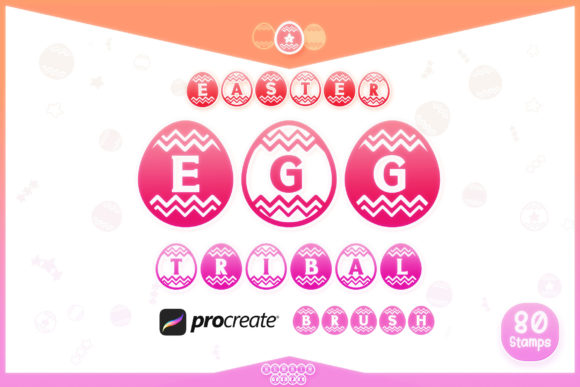
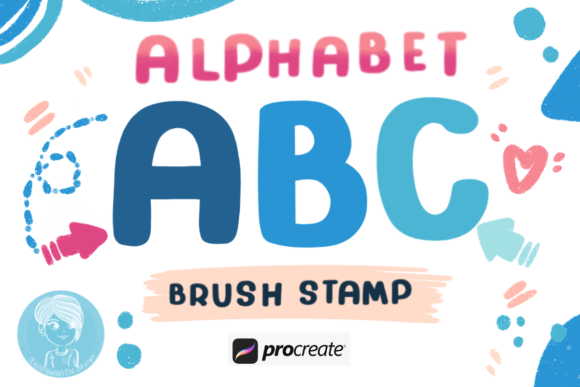
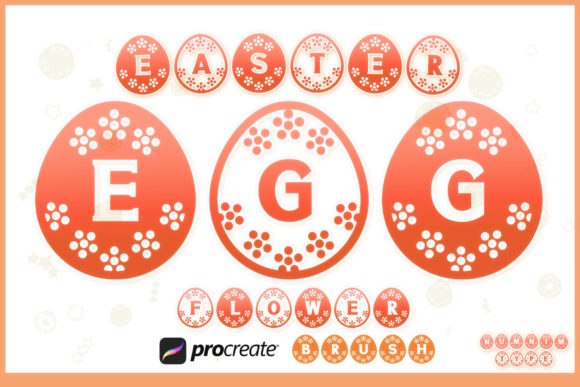
Before diving into design work, it is crucial to recognize what this package actually delivers. You receive one zipped file containing a comprehensive Procreate brush set. This includes twenty-six alphabet brush stamps in Style 1, another twenty-six in Style 2, numbers zero through nine in two distinct styles, and various decorative doodles. It is important to note that while the primary format is optimized for Procreate, font and SVG versions are available separately on the Numnim Type Store. Confusing these formats is a frequent error among beginners who may expect editable vector paths within the Procreate app itself.
Procreate brushes are raster-based. This means that once you stamp a letter, it becomes pixels, not scalable vectors. Understanding this limitation helps manage expectations regarding resolution and editing flexibility. If you require infinite scalability for large-format printing, you should consider the SVG option from the store instead. For digital screens, prints, and standard marketing materials, the brush format is highly efficient and user-friendly.
Ignoring Layer Management
One of the most significant errors users make when working with alphabet stamp brushes is cluttering their canvas. Because each letter is a separate stamp, it is tempting to place them all on a single layer. This approach severely limits your ability to adjust spacing, color, or position later. If you realize the kerning between the "E" and "A" in "EASTER" is too tight, moving them individually becomes impossible if they share a layer.
Better Approach: Always create a new layer for each word or even each letter if precise control is needed. This habit allows you to use the transform tool freely without affecting surrounding elements. It also enables you to apply different blending modes or opacity levels to individual characters, adding depth and visual interest to your typography.
Overlooking Scale and Resolution
Another frequent oversight involves the size at which these brushes are used. Since these are pre-designed stamps, scaling them up significantly beyond their intended size can result in pixelation or loss of detail. Conversely, scaling them down too much may cause intricate floral details to merge into indistinct blobs. Users often complain about "blurry" results when the issue is actually improper scaling relative to the canvas resolution.
Better Approach: Test the brush at various sizes on a duplicate layer before committing to your final design. Find the sweet spot where the floral details remain crisp. If you need larger text, consider increasing your canvas DPI (dots per inch) to 300 or higher before starting. This ensures that even if you scale the brush up, the underlying pixel density supports high-quality output.
Neglecting Color Harmony
The Procreate Brush Easter Egg Flower Letter designs are intricate. Applying flat, solid colors without considering shading or texture can make the letters look stiff and disconnected from the rest of the artwork. A common mistake is using the default black or a single bright color for all letters, which fails to leverage the organic nature of the floral elements.
Better Approach: Use the alpha lock feature on your text layers to paint gradients, shadows, or textures directly onto the letters. Try using a soft airbrush to add subtle highlights to the petals within the letters. This technique integrates the typography into the scene, making it feel like part of the illustration rather than a sticker placed on top.
Maximizing Efficiency with Dual Styles
This set provides two distinct styles for both alphabets and numbers. A missed opportunity for many users is failing to differentiate between these styles for hierarchical purposes. Using Style 1 for headers and Style 2 for subheaders or accents can create a sophisticated visual hierarchy without needing additional fonts.
For example, you might use the bolder, more prominent Style 1 for the main title of an Easter sale flyer, while employing the delicate Style 2 for pricing or date information. This contrast guides the viewer’s eye naturally through the content. Additionally, the included number brushes allow for consistent styling across dates and prices, eliminating the need to hunt for matching numeric fonts.
Integrating Doodles for Cohesion
The included doodles are not merely extra bonuses; they are essential tools for balancing your composition. A common error is treating the alphabet stamps and doodles as separate entities. This leads to designs where the text feels isolated from the decorative elements.
To avoid this, use the doodles to bridge gaps between letters or to frame the text. If a word ends abruptly, a small floral sprig from the doodle set can soften the edge. Ensure that the doodles share the same color palette and lighting direction as the letters. This creates a unified aesthetic that feels intentional and professionally crafted.
Pre-Purchase and Usage Checklist
Before integrating this tool into your workflow, verify your technical setup. Ensure your version of Procreate is updated to support the latest brush features. Check that your iPad has sufficient storage for the unzipped files, although the size is generally manageable.
When evaluating whether this set fits your project, ask yourself:
- Does my project require raster-based quick assembly, or do I need vector editability?
- Is the floral theme appropriate for my target audience?
- Do I have the skills to adjust colors and layers to customize the default look?
If you need full vector control, remember to visit the Numnim Type Store for the SVG versions. For most digital creators, however, the Procreate brush format offers the best balance of speed and artistic flexibility.
Final Thoughts on Quality and Application
The value of the Procreate Brush Easter Egg Flower Letter lies in its ability to accelerate the creation of seasonal designs. By avoiding common mistakes such as poor layer management, incorrect scaling, and flat coloring, you can elevate your work from amateur to professional. Treat these brushes as building blocks rather than finished products. Your input in terms of color, composition, and context is what transforms simple stamps into compelling visual communication.
Take time to experiment with the dual styles and doodles. Blend them with hand-lettered elements for a hybrid look that stands out. With careful attention to detail and a strategic approach to layering, this brush set can become a staple in your spring design toolkit, saving you hours of manual illustration while maintaining a high standard of aesthetic quality.