Mastering Natural Textures with the Procreate Dynamic Color Grass Brush
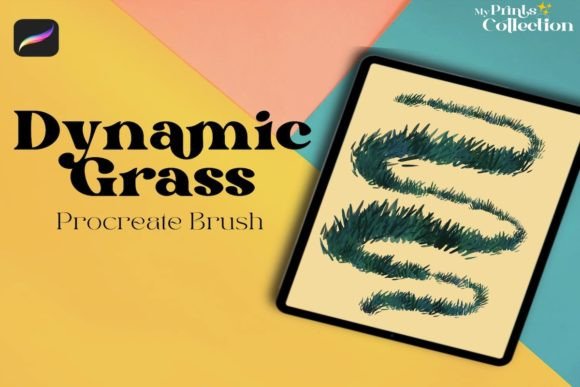
Digital illustration often hits a wall when artists attempt to render organic textures. Hair, fur, and especially grass can feel stiff, repetitive, or unnaturally uniform. This is where specialized tools make a tangible difference in workflow efficiency and final aesthetic quality. The Procreate Dynamic Color Grass Brush addresses this specific friction point by offering a solution that mimics the chaotic yet harmonious structure of real foliage. It is not merely a stamp; it is a dynamic tool designed to respond to your pressure and tilt, creating varied strokes that look hand-drawn rather than computer-generated.
For creators working within the iPad ecosystem, finding assets that integrate seamlessly into an existing workflow is crucial. This single brush file, compatible with Procreate App version 5 or higher, provides a targeted solution for adding depth and realism to nature landscapes without the need for complex layering or manual detailing of every individual blade. Understanding how to leverage this tool can transform a flat background into a living, breathing environment.
Bridging the Gap Between Concept and Realism
The primary value of the Dynamic Color Grass Single Brush lies in its ability to save time while maintaining artistic integrity. In traditional digital painting, creating a meadow might involve hundreds of individual strokes, each adjusted for angle and color variation. This process is tedious and prone to resulting in patterns that the human eye recognizes as artificial. By using a brush engineered with dynamic color properties, the software handles much of the micro-variation automatically.
This allows the artist to focus on composition and lighting rather than getting bogged down in repetitive motion. When you swipe across the canvas, the brush interprets the movement to create clusters of grass that vary in length, density, and hue. This is particularly useful for concept artists who need to convey mood and setting quickly. A landscape painter can block in foreground elements rapidly, establishing a sense of scale and texture that invites the viewer into the scene.
Practical Applications for Different Creators
The utility of this brush extends beyond fine art landscapes. Various professionals and hobbyists can integrate this tool into their specific workflows to enhance their output.
Children’s Book Illustrators and Storytellers
Illustrators working on children’s books often need to create whimsical, soft, and inviting environments. Hard, vector-like lines can feel cold or overly technical for these narratives. The organic flow of the grass brush helps create storybook settings that feel warm and approachable. Whether depicting a picnic scene, a forest edge, or a magical garden, the brush allows for quick iteration. An illustrator can test different color palettes for the foliage to match the emotional tone of the page—lush greens for summer, muted browns for autumn—without repainting the entire texture from scratch.
Game Asset Designers and Environment Artists
While high-end 3D games rely on complex modeling, many indie developers and mobile game designers utilize 2D or 2.5D art styles. For these projects, hand-painted textures are highly valued for their unique charm. The Procreate Dynamic Color Grass Brush can be used to paint base textures for ground cover in side-scrolling platforms or top-down adventure games. Because the brush creates natural-looking clumps, it reduces the "tiling" effect that often plagues repetitive background assets. Designers can paint unique patches of grass that serve as visual guides or obstacles, enhancing gameplay clarity through artistic detail.
Graphic Designers and Marketing Materials
In commercial design, nature motifs are frequently used to evoke feelings of growth, sustainability, and freshness. Brands focusing on eco-friendly products, organic foods, or outdoor recreation often require custom illustrations for packaging, social media posts, and web banners. Instead of relying on generic stock photos, designers can use this brush to create bespoke botanical elements. This ensures brand uniqueness and avoids licensing issues associated with stock imagery. A marketing team can quickly generate seasonal graphics, such as spring sale banners featuring fresh meadows, by leveraging the speed and flexibility of this digital tool.
Technical Considerations and Workflow Integration
Before downloading and implementing any new digital asset, it is essential to understand its technical constraints and requirements. The Procreate Dynamic Color Grass Single Brush is distributed as a .brushset file contained within a 1 MB zip archive. This small file size indicates efficient coding, ensuring it does not bloat your library or slow down your device. However, users must ensure they are running Procreate App version 5 or higher. Older versions may not support the dynamic color engines or brush settings utilized in this tool, leading to unexpected results or incompatibility.
It is also critical to note that this is a Digital Product. No physical item will be shipped. Upon completing your purchase order, you will receive a download link for the zip file. This immediate delivery model is ideal for freelancers and entrepreneurs who need resources on demand. There is no waiting for shipping; you can download, install, and start creating within minutes. However, this also means users should have a reliable method for managing their digital downloads and backing up their purchased assets to prevent data loss.
Furthermore, this brush is not compatible with Photoshop or Illustrator. It is built specifically for the Procreate engine on iPad. Users attempting to import this file into Adobe Creative Cloud applications will find it unusable. This specificity is a strength for Procreate users, as the brush is optimized for touch input, Apple Pencil pressure sensitivity, and the specific rendering pipeline of the app. But it requires commitment to the iPad workflow. If your pipeline involves moving between desktop and tablet extensively, you may need to recreate similar effects in other software manually, which could offset some of the time-saving benefits.
Maximizing the Potential of Dynamic Color
To get the most out of this tool, users should experiment with the color dynamics settings. The term "dynamic color" implies that the brush does not just apply a single flat hue. Instead, it likely shifts tones based on stroke direction, pressure, or randomization algorithms. Artists should spend time testing different base colors to see how the brush reacts. A dark green base might produce lighter highlights at the tips of the grass, simulating sunlight, while a brown base might create dry, withered textures suitable for arid landscapes.
Layering is another key technique. Using the brush on multiple layers with different blend modes can create depth. A bottom layer with darker, denser strokes can establish shadow and volume, while a top layer with lighter, sparser strokes can catch the light. This approach mimics the way light interacts with real vegetation, where not every blade is equally illuminated. By varying opacity and flow, users can achieve a painterly effect that feels spontaneous and alive.
Making the Right Choice for Your Toolkit
Investing in specialized brushes like the Procreate Dynamic Color Grass Brush is about evaluating your current pain points. If you find yourself dreading the process of painting foliage, or if your nature scenes lack the organic randomness of the real world, this tool offers a direct solution. It is not a magic button that replaces skill, but it is a lever that amplifies your existing abilities. For educators teaching digital art, it can serve as an excellent example of how tool selection impacts artistic outcome, helping students understand the importance of matching resources to creative intent.
Ultimately, the value of this brush lies in its ability to streamline the creation of natural elements. It allows creators to spend less time on tedious detailing and more time on storytelling, composition, and conceptual development. Whether you are a hobbyist sketching weekend landscapes or a professional designer crafting brand assets, integrating this tool can elevate the quality and authenticity of your digital art.