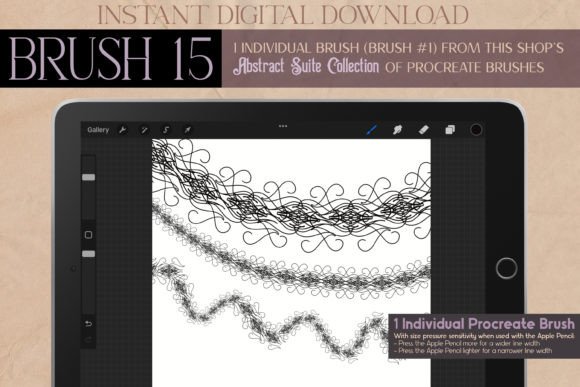
Elevate Your Digital Art with Procreate Brush 15 - Abstract Suite
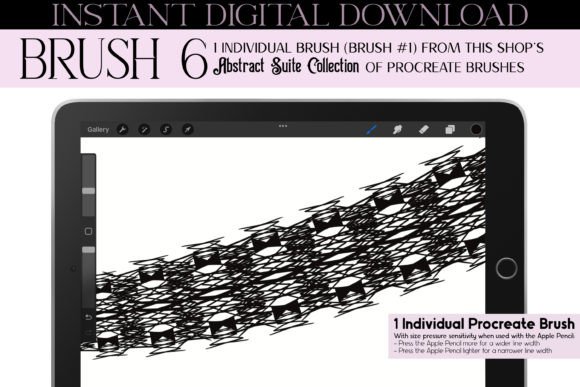
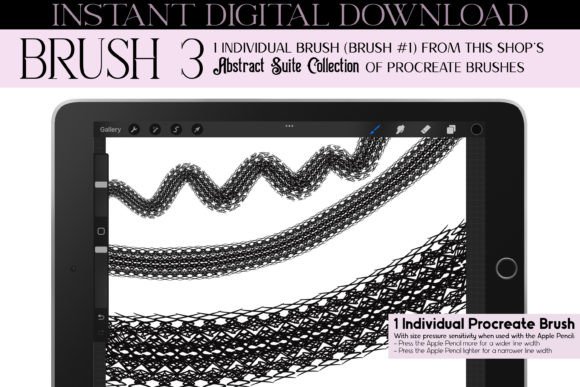
In the rapidly evolving world of digital illustration, finding tools that bridge the gap between technical precision and artistic soul can be a challenge. Many artists struggle with brushes that feel too rigid or generic, lacking the unique character needed to make their work stand out in a saturated market. This is where Procreate Brush 15 - Abstract Suite emerges as a transformative solution for creators seeking depth, versatility, and a distinct aesthetic edge. Designed for the iPad, iPad Pro, and iPhone, this single, meticulously crafted brush offers an instant download experience that integrates seamlessly into your existing workflow, requiring only the Procreate app to unlock its full potential.
The Challenge of Finding Unique Digital Textures
Digital artists often face a common hurdle: the "sterile" look. While digital tools offer unparalleled convenience, they can sometimes lack the organic imperfections and intricate details found in traditional media. Whether you are designing jewelry concepts, creating fashion illustrations, or developing complex tattoo designs, standard brushes may not provide the quirky, hand-drawn feel necessary to convey luxury, mystery, or vintage charm. Artists frequently spend hours tweaking settings or layering multiple textures to achieve a look that feels authentic and engaging. The need for a tool that instantly injects personality into line art and shading is paramount for professionals and hobbyists alike who wish to elevate their portfolio without sacrificing efficiency.
A Fusion of Historical Aesthetics and Modern Utility
Procreate Brush 15 - Abstract Suite addresses these needs by drawing inspiration from a rich tapestry of historical and stylistic movements. It is not merely a tool for drawing lines; it is a conduit for specific moods and atmospheres. Inspired by Art Deco geometry, the flowing curves of Art Nouveau, the moody intellect of Dark Academia, and the mechanical elegance of Steampunk, this brush allows users to infuse their work with a sense of history and fantasy.
The brush was created from a digitally hand-drawn illustration, ensuring that every stroke retains the quirks and nuances of human creation. This results in an output that feels less like a computer-generated pattern and more like an intentional, artistic choice. For those aiming to create works that evoke a mystical, fairy-tale, or witchy ambiance, this brush provides the foundational texture needed to build such narratives visually. It supports a wide range of aesthetics, from the bold and graphic to the intricate and kawaii, making it a versatile asset for diverse creative projects.
Practical Applications Across Creative Industries
The true value of Procreate Brush 15 - Abstract Suite lies in its adaptability. It is not limited to a single genre or style but serves as a multi-purpose tool for various design challenges. Below are several key areas where this brush can significantly enhance your creative output:
- Fashion and Textile Design: Create intricate lace patterns, embroidery details, and fabric textures. The brush excels at adding embellishments to clothing sketches, allowing designers to visualize stitching, seams, and ornamental borders with ease. It is particularly effective for retro vintage fashion illustrations spanning Summer, Spring, Fall, and Winter collections.
- Jewelry and Accessory Illustration: When sketching necklaces, bracelets, or earrings, the fine, classy lines of this brush help define metallic structures and gemstone settings. It adds a layer of luxury and refinement to product sketches, making them appear more tangible and high-end.
- Tattoo and Body Art Concepts: Tattoo artists require brushes that can handle both bold graphic shapes and delicate, symmetrical patterns. This brush facilitates the creation of ornamental mandalas, geometric patterns, and abstract line work that translates well into ink, offering a preview of how the final tattoo might sit on the skin.
- Interior Decoration and Architecture: For interior designers and architects, the brush can be used to add decorative elements to floor plans or mood boards. Think of intricate wall borders, wallpaper patterns, or furniture embellishments that require a touch of elegance and symmetry.
- Stationery and Event Design: From wedding invitations to Halloween party decor, the brush’s versatility shines in graphic design. It can create festive borders for Christmas cards, elegant frames for Valentine’s Day notes, or spooky, magical elements for Thanksgiving and Easter celebrations. It is an ideal tool for homeschooling resources, school projects, and university graduation card decor.
Enhancing Workflow for Different User Profiles
Different creators will approach Procreate Brush 15 - Abstract Suite in unique ways, depending on their specific goals and expertise levels. Understanding how to leverage this tool based on your role can maximize its utility.
For the Professional Illustrator: Time is money. This brush reduces the time spent on repetitive detailing. Instead of manually drawing every swirl in a lace pattern, you can use the brush to lay down complex structures quickly, then refine them. It allows for rapid prototyping of ideas, whether you are working on comic book backgrounds, anime character outfits, or manga-style effects.
For the Hobbyist and Student: Learning curve reduction is key. The brush’s intuitive nature means that even those new to digital art can achieve professional-looking results. It encourages experimentation with symmetry and geometric patterns, helping students understand balance and composition in a hands-on way. It is an excellent resource for college and university art students looking to add a unique signature style to their portfolios.
For the Small Business Owner: If you run an Etsy shop or a custom printing business, this brush can help differentiate your products. Use it to create unique nail art designs, makeup mockups, or portrait art enhancements. The ability to quickly generate bold graphic designs and abstract lines allows for the rapid creation of social media content, promotional materials, and product variations.
Technical Considerations and Best Practices
To get the most out of Procreate Brush 15 - Abstract Suite, consider the following implementation tips. Since the brush is designed for the Procreate ecosystem, ensure your iPad or iPhone is updated to support the latest features of the app. Utilize the symmetry guide within Procreate when creating mandalas or jewelry designs to ensure perfect balance. The brush works exceptionally well with layer blending modes; try overlaying strokes with different opacities to create depth and a sense of three-dimensionality in your abstract lines.
Furthermore, because the brush is inspired by diverse styles such as Steampunk and Dark Academia, pairing it with a muted, earthy color palette can enhance the vintage feel. Conversely, using bright, contrasting colors can push the aesthetic toward a more modern, pop-art or kawaii direction. Experimentation with pressure sensitivity is also recommended; varying your stroke weight can transform a simple line into a dynamic, expressive element that mimics traditional ink pen doodles.
Conclusion: A Versatile Tool for Modern Creativity
In conclusion, Procreate Brush 15 - Abstract Suite is more than just a digital asset; it is a catalyst for creativity. By combining the elegance of historical art movements with the flexibility of modern digital tools, it empowers artists to overcome the limitations of standard brushes. Whether you are designing intricate jewelry, illustrating a fantasy novel, creating holiday stationery, or simply exploring abstract art, this brush provides the unique, hand-drawn quality that audiences crave. Its ability to adapt to various seasons, themes, and professional needs makes it an indispensable addition to any digital artist’s toolkit. Embrace the fusion of technology and tradition, and let your next project reflect the intricate, classy, and magical potential that this abstract suite offers.