Mastering Fireworks Brush Presets for Digital Art
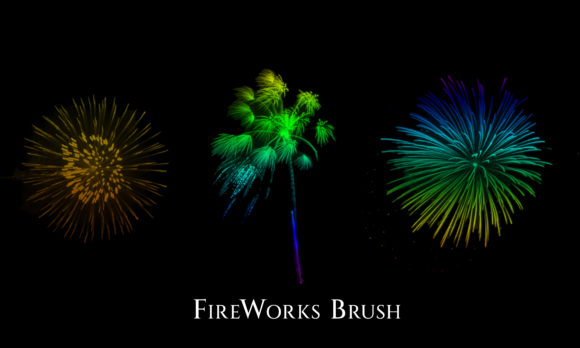
Digital illustration often demands a balance between technical precision and spontaneous creativity. When working on projects that require vibrancy, motion, or celebration, artists frequently encounter the challenge of rendering complex light effects manually. This is where Fireworks Brush Presets become an invaluable asset in a designer’s toolkit. These specialized tools allow creators to generate intricate, colorful fireworks with a single stroke, transforming hours of meticulous layering into moments of intuitive expression. For professionals and hobbyists alike, understanding how to leverage these presets can significantly enhance workflow efficiency while elevating the visual impact of digital compositions.
Enhancing Workflow Efficiency in Digital Design
The primary advantage of utilizing Fireworks Brush Presets lies in time conservation. Creating realistic pyrotechnic displays from scratch involves mastering particle systems, blending modes, and opacity variations. Each burst requires careful attention to the trajectory of sparks, the glow of the explosion, and the fading trails left behind. By integrating pre-configured brushes, designers bypass the repetitive technical setup. This shift allows them to focus on composition and narrative rather than getting bogged down in mechanical execution.
Consider a marketing professional designing a social media campaign for a New Year’s event. The deadline is tight, and the visual needs to pop against a dark background. Instead of spending half a day painting individual sparks, the designer can select a high-quality preset, adjust the hue to match brand colors, and place the effect strategically. This approach not only meets the deadline but also ensures a polished, professional look that might be difficult to achieve quickly through manual painting alone.
Achieving Visual Consistency and Professional Polish
Beyond speed, consistency is crucial for any serious creative project. When creating a series of illustrations or a multi-page document, maintaining a uniform style for light effects can be challenging. Fireworks Brush Presets offer a standardized base that ensures every explosion shares similar characteristics in terms of density, spread, and texture. This uniformity helps strengthen communication within a design, as the viewer perceives a cohesive visual language.
For educators creating engaging presentation materials, consistent visuals help maintain student attention without causing cognitive overload. If a teacher uses colorful fireworks to highlight key achievements or correct answers in a quiz, using the same brush style throughout the lesson creates a familiar visual cue. Students learn to associate that specific aesthetic with positive reinforcement, making the learning experience more intuitive and rewarding.
Unlocking Creative Possibilities with Color and Texture
While the structure of the brush provides the foundation, the true magic happens when users experiment with color dynamics. High-quality presets are designed to interact seamlessly with color settings, allowing for endless variation. A single brush tip can produce golden cascades, neon bursts, or pastel sparkles depending on the foreground and background colors selected. This flexibility supports creativity by encouraging experimentation.
Freelance illustrators often face clients who want unique, bespoke imagery. By mastering the underlying settings of these presets—such as scattering, size jitter, and angle jitter—artists can customize standard brushes to create signature styles. For instance, combining a soft round brush with a firework preset can create a dreamy, ethereal glow suitable for fantasy book covers. Conversely, increasing the hardness and contrast can yield sharp, energetic bursts ideal for comic book action scenes. The ability to tweak these parameters means the tool adapts to the artist’s vision, rather than constraining it.
Practical Applications Across Industries
The utility of Fireworks Brush Presets extends far beyond traditional digital painting. Small business owners managing their own branding can use these elements to add festivity to promotional graphics, email headers, or website banners. A local bakery launching a new celebratory cake line might use subtle, elegant sparkles to convey joy and quality without overwhelming the product photography.
Publishers and bloggers also benefit from these tools. Article headers featuring dynamic light effects can increase click-through rates by drawing the eye. However, it is essential to use these elements judiciously. Overuse can lead to visual clutter, distracting from the core message. The key is integration; the fireworks should complement the text and other design elements, not compete with them. A well-placed burst can guide the viewer’s gaze toward a call-to-action button or a headline, improving overall user experience.
Selecting the Right Tools for Your Needs
Not all brush presets are created equal. When choosing Fireworks Brush Presets, consider the resolution and scalability of the assets. High-resolution brushes ensure that edges remain crisp even when scaled up for large-format prints. Additionally, look for presets that offer transparency and blending mode compatibility. This ensures that the fireworks integrate naturally with existing layers, whether they are placed over photographs, solid colors, or complex gradients.
It is also wise to evaluate the source of the presets. Reputable creators often provide documentation on how to adjust settings for different software versions, such as Adobe Photoshop, Procreate, or Clip Studio Paint. Understanding the specific requirements of your chosen platform prevents frustration and ensures smooth installation. For beginners, starting with a smaller, curated set of brushes is often more effective than downloading massive packs with hundreds of redundant options. A focused selection allows for deeper mastery of each tool’s potential.
Navigating Limitations and Best Practices
While these tools are powerful, they are not a substitute for fundamental artistic skills. Relying solely on presets can result in generic-looking artwork if not customized. To avoid this, always modify the default settings. Adjust the opacity flow, change the color dynamics, and combine multiple brush strokes to build depth. Real fireworks have randomness and imperfection; mimicking this organic quality requires manual intervention alongside the preset.
Furthermore, consider the context of your audience. In corporate communications, subtle, muted tones may be more appropriate than vibrant, chaotic explosions. Understanding the emotional tone you wish to convey is critical. Colorful fireworks evoke excitement and celebration, but they can also appear chaotic if not balanced with negative space and clean typography. Always step back and assess the overall composition to ensure the effects serve the design’s purpose.
In conclusion, Fireworks Brush Presets offer a practical solution for enhancing digital art with minimal effort and maximum impact. By saving time, ensuring consistency, and providing a canvas for creative experimentation, these tools empower designers, marketers, and educators to produce high-quality visuals. Whether you are crafting a festive holiday card or a professional marketing asset, integrating these presets thoughtfully can elevate your work and help you achieve your creative goals with greater ease and confidence.