Dans Pencil Brush: Mastering Analog Texture Digitally
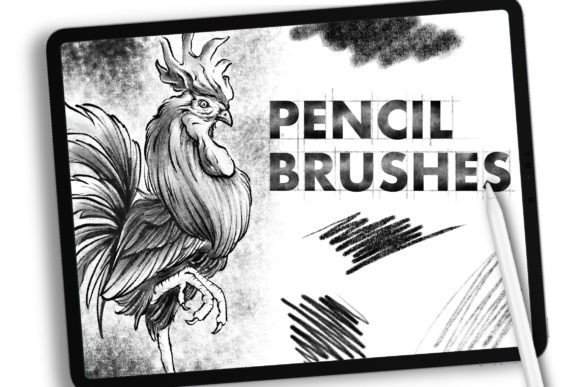
We have been working with the graphic design world for a long time, witnessing the shift from physical sketchpads to glowing screens. Recently, we noticed a distinct demand for special materials tailored for creators who want to bridge the gap between traditional media and digital illustration. As designers, we understand the frustration of sterile, perfect lines that lack soul. We have spent hours dedicated to creating handcrafted analog-style resources specifically for working digitally on Procreate using the iPad Pro and Apple Pencil. The result is Dans Pencil Brush, a toolset designed to restore the tactile joy of drawing to your digital workflow.
Bridging the Gap Between Paper and Pixel
The core philosophy behind Dans Pencil Brush is simple: digital tools should not feel like software; they should feel like extensions of your hand. For years, digital art suffered from a reputation of being too clean, too uniform, and ultimately, too cold. While vector graphics have their place in logo design and technical illustration, character design, concept art, and editorial illustrations thrive on imperfection. They need grit, texture, and the subtle variations that occur when graphite meets toothy paper.
This brush set addresses that specific need. It is not just another collection of generic pencils; it is a curated response to the nuanced requirements of professional illustrators. By meticulously sampling real-world textures and programming complex pressure sensitivities, we have created a resource that allows you to have perfect creation possibilities without sacrificing the organic feel of traditional media. Whether you are sketching initial concepts or rendering final details, the transition feels seamless.
Key Characteristics and Strengths
What sets this brush set apart from the thousands of free downloads available online? The answer lies in the engineering behind the stroke. We focused on three primary pillars: responsiveness, texture fidelity, and versatility.
- Pressure Sensitivity Calibration: The brushes react intuitively to the tilt and pressure of the Apple Pencil. A light touch produces a faint, scratchy line reminiscent of an HB pencil, while pressing harder deposits darker, richer graphite tones, mimicking a 4B or 6B lead.
- Authentic Grain: We avoided repetitive digital patterns. Instead, the texture engine introduces random noise and grain variation, ensuring that no two strokes look exactly alike. This prevents the "tiled" look that plagues lower-quality brushes.
- Layer Blending Compatibility: These brushes are optimized to work harmoniously with Procreate’s blending modes. You can layer strokes to build up depth, smudge them for soft shadows, or erase with precision, just as you would with a kneaded eraser on paper.
Practical Applications for Modern Creators
The utility of Dans Pencil Brush extends far beyond hobbyist sketching. Its robust feature set makes it a valuable asset across various professional and creative environments.
Professional Illustration and Concept Art
For freelance illustrators and studio artists, speed and expressiveness are currency. Using these brushes allows for rapid ideation. You can block out shapes quickly with broad, textured strokes and then switch to finer tips for detailing. The analog aesthetic helps clients visualize the final product more effectively than rigid vector lines, providing a warmer, more approachable presentation during pitch meetings.
Educational Content and E-Learning
Educators and course creators often struggle to make digital diagrams engaging. Standard whiteboard apps can feel sterile. By incorporating hand-drawn elements created with Dans Pencil Brush, teachers can add a human touch to their slides and video tutorials. This slight imperfection increases viewer retention, as the brain perceives hand-drawn content as more personal and less automated.
Branding and Marketing Materials
In a market saturated with polished, corporate imagery, brands are increasingly turning to "handcrafted" aesthetics to stand out. Marketing teams can use these brushes to create unique social media graphics, packaging sketches, or website headers that convey authenticity. A hand-lettered quote or a sketched product diagram can significantly boost engagement by breaking the visual monotony of stock photography.
Enhancing Productivity and User Experience
One of the most significant benefits of using a high-quality brush set is the reduction in post-processing time. When your base strokes already contain the desired texture, you spend less time adding noise filters or overlaying paper textures in Photoshop. This streamlines the workflow, allowing you to focus on composition and storytelling rather than technical fixes.
Furthermore, the psychological impact of using tools that feel good cannot be overstated. Friction in the creative process often leads to burnout or creative block. When the tool responds predictably and pleasantly, it encourages experimentation. You are more likely to take risks and explore new styles when you trust your instruments. Dans Pencil Brush fosters this trust by delivering consistent, high-quality results every time you lift the stylus from the screen.
Considerations for Implementation
While the technology is advanced, getting the most out of these brushes requires a mindful approach. Here are a few recommendations for integrating them into your daily practice:
- Calibrate Your Device: Ensure your iPad Pro and Apple Pencil are updated to the latest firmware. Check your pressure curve settings in Procreate to match your personal drawing style. Some artists prefer a steeper curve for bold lines, while others prefer a linear response for subtlety.
- Experiment with Canvas Textures: While the brushes have built-in grain, pairing them with a high-resolution paper texture canvas can enhance the realism. Try different paper types—rough watercolor paper for heavy texture or smooth bristol board for cleaner lines.
- Layer Management: To maintain flexibility, keep your sketch layers separate from your render layers. Use the pencil brushes on a multiply layer for shading, allowing you to adjust opacity without affecting the underlying line work.
Final Thoughts on Digital Craftsmanship
The evolution of digital art does not mean abandoning traditional skills; it means adapting them to new mediums. Dans Pencil Brush represents a commitment to preserving the warmth and humanity of hand-drawn art in a digital age. For professionals, entrepreneurs, and hobbyists alike, it offers a reliable, high-quality solution for creating illustrations that resonate on a human level.
By choosing tools that prioritize authentic interaction over artificial perfection, you elevate the quality of your work. Whether you are designing a next-level app interface, illustrating a children's book, or simply journaling your thoughts, the right tools make all the difference. Embrace the texture, enjoy the process, and let your creativity flow with the confidence that comes from using resources crafted by designers, for designers.