Streamlining Creative Workflows with a High-Resolution Watercolor Photo Effect PSD
In the evolving landscape of digital design, the demand for unique, artistic aesthetics has grown significantly. Among the most sought-after styles is the watercolor effect, which blends the organic fluidity of traditional painting with the precision of digital photography. For designers, photographers, and creative enthusiasts, achieving this look manually can be time-consuming and technically demanding. This is where a specialized Watercolor Photo Effect PSD becomes an invaluable resource. By leveraging pre-built templates, users can transform standard images into stunning artistic pieces with minimal effort, balancing quality with efficiency.
Understanding the Value of Pre-Built Smart Object Templates
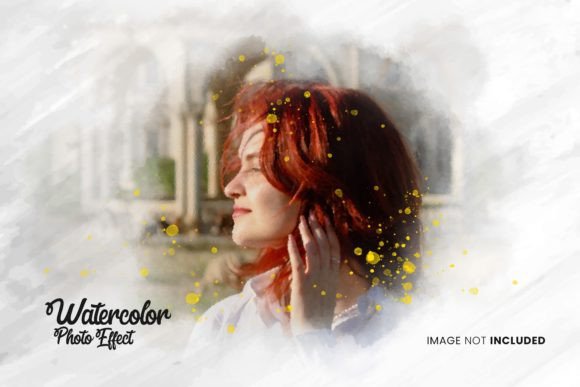
A Watercolor Photo Effect PSD is not merely a filter or a preset; it is a comprehensive Adobe Photoshop file engineered to replicate the complex textures, splashes, and color bleeds characteristic of watercolor painting. The core technology behind these templates relies on Smart Objects. This feature allows users to replace placeholder images with their own photographs while automatically applying all associated effects, masks, and adjustments.
The primary advantage of this approach is accessibility. Traditional methods of creating watercolor effects involve multiple layers of manual brushwork, careful masking, and intricate blending mode adjustments. For professionals working under tight deadlines, or for hobbyists who lack advanced painting skills, this process can be prohibitive. A well-structured PSD template democratizes this artistic style, making it accessible to users of varying skill levels. The promise of "just a few clicks" is not marketing hyperbole but a reflection of how Smart Objects streamline the workflow. By double-clicking the smart object layer, pasting your image, and saving, the template handles the heavy lifting of texture mapping and color integration.
Evaluating Technical Specifications: Resolution and DPI
When comparing different digital assets, technical specifications are critical decision factors. A high-quality Watercolor Photo Effect PSD should offer substantial resolution to ensure versatility in output. Templates offering a resolution of 4500 x 3000 pixels at 300 DPI (dots per inch) stand out as professional-grade resources. This specification is particularly important for two reasons:
- Print Quality: 300 DPI is the industry standard for high-quality printing. Whether you are creating wall art, greeting cards, or magazine layouts, this resolution ensures that the watercolor textures remain crisp and detailed, without pixelation or blurriness.
- Editing Flexibility: Higher resolution provides more data to work with. It allows for cropping, resizing, and further manipulation without significant loss of quality. For digital use, such as social media or web banners, you can downscale from this high-resolution base, ensuring optimal clarity across all platforms.
Lower-resolution alternatives may suffice for quick social media posts, but they often fail when scaled up for print or large-format displays. Therefore, evaluating the DPI and pixel dimensions is a crucial step in selecting a template that offers long-term value.
Usability and File Organization: Key Decision Factors
The user experience of a PSD template is heavily influenced by its internal organization. A chaotic file structure can negate the time-saving benefits of using a template. The best Watercolor Photo Effect PSD files feature meticulously organized layers. This includes clearly labeled groups for background textures, color overlays, shadow effects, and the primary smart object layer.
Organization facilitates customization. While the template provides a base effect, users often need to tweak specific elements to match their brand colors or artistic vision. If the layers are grouped logically, adjusting hues, saturation, or opacity becomes straightforward. For instance, if the default watercolor splash is too dominant, a well-organized file allows you to lower the opacity of that specific group without affecting the photo’s integrity. Conversely, poorly organized files force users to hunt through dozens of unnamed layers, increasing frustration and the likelihood of errors.
Additionally, the inclusion of supplementary files enhances usability. A comprehensive package typically includes:
- The PSD File: The fully editable Photoshop document.
- JPG Preview: A high-resolution image showing the final result, useful for quick reference or portfolio display.
- ReadMe.txt: A simple instruction file guiding users through the replacement process. This is particularly helpful for beginners who may be unfamiliar with Smart Objects.
Comparing PSD Templates to Manual Editing and Automated Apps
To make an informed choice, it is helpful to compare Watercolor Photo Effect PSD templates against other common methods of achieving similar results.
Manual Painting in Photoshop
Creating a watercolor effect from scratch offers maximum creative control. You can dictate exactly where the paint flows, how colors blend, and the specific texture of the paper. However, this method requires a high level of artistic skill, a digital tablet, and significant time investment. It is best suited for professional digital artists who need bespoke results for high-end projects. For most users, the learning curve and time commitment make this approach impractical for routine tasks.
Mobile Apps and One-Click Filters
On the other end of the spectrum are mobile applications and online tools that apply watercolor filters with a single tap. These are incredibly fast and require no technical knowledge. However, they often lack depth and customization. The effects can appear generic, flat, or overly processed, lacking the nuanced textures and realistic light interactions found in high-quality PSDs. Furthermore, these apps rarely offer the resolution needed for professional print work.
The Middle Ground: PSD Templates
A Watercolor Photo Effect PSD strikes a balance between these extremes. It provides the high-quality, textured realism of manual painting with the speed and ease of automated filters. Users retain control over color adjustments and layer opacity, allowing for personalization, while the Smart Object technology eliminates the need for manual brushwork. This makes it an ideal choice for photographers, graphic designers, and small business owners who need professional-looking results efficiently.
Customization and Color Flexibility
One of the standout features of a robust watercolor template is color adaptability. Watercolor art is defined by its vibrant, flowing hues. A versatile PSD allows users to change all colors easily. This is typically achieved through adjustment layers such as Hue/Saturation or Color Balance, which are linked to the texture layers. By tweaking these settings, you can transform a cool blue-toned watercolor effect into a warm, autumnal palette, or match specific brand guidelines. This flexibility ensures that the template is not a one-time use asset but a reusable tool for various projects.
It is important to note that images used in promotional materials are often examples for presentation purposes only. Users must provide their own photographs. The quality of the final output depends partly on the source image. High-contrast photos with clear subjects tend to work best with watercolor effects, as the textures can sometimes obscure fine details in low-contrast images.
When to Choose a Watercolor PSD Template
Deciding whether a Watercolor Photo Effect PSD is the right tool depends on your specific needs and constraints. Consider this option if:
- You need high-resolution files suitable for print media.
- You want a consistent, professional aesthetic across multiple images.
- You have basic Photoshop knowledge but lack advanced painting skills.
- You are working under time constraints and need efficient workflows.
- You desire the ability to customize colors and textures to fit a specific theme.
However, if you require complete artistic freedom to paint every brushstroke manually, or if you need instant results without any software installation, alternative methods may be more appropriate. For those seeking a balance of quality, control, and efficiency, a well-organized, high-resolution PSD template remains a superior choice.
Ultimately, integrating a Watercolor Photo Effect PSD into your creative toolkit can significantly enhance your productivity. By understanding the technical specifications, organizational benefits, and comparative advantages, you can select resources that truly meet your professional standards. As you explore these templates, remember to review the included documentation and experiment with color adjustments to fully leverage the potential of your new digital assets. And for those interested in expanding their creative library, exploring other works by the same creator can reveal complementary styles and effects that further streamline your design process.