Mastering the Grunge Stroke Effect: A Practical Guide to Integrating the Stroke Brush Set into Your Creative Workflow
In the fast-paced world of digital design, texture is often the missing ingredient that separates a flat, generic composition from a piece with depth and character. The Stroke Brush Set, featuring a distinct Grunge Stroke Effect, serves as a vital asset for designers who need to inject organic energy into their work without sacrificing efficiency. This collection is not merely a decorative add-on; it is a functional tool designed to streamline the texturing process across various media formats. By understanding how to integrate these assets into your broader creative pipeline, you can enhance productivity while maintaining high aesthetic standards.
Understanding the Role of Textured Assets in Modern Design
Before diving into technical implementation, it is essential to recognize where the Stroke Brush Set fits within a project’s lifecycle. In professional workflows, texture application often occurs during the refinement phase, after the core layout and typography are established. However, using grunge elements early in the conceptual stage can also influence compositional decisions, guiding the placement of other visual elements.
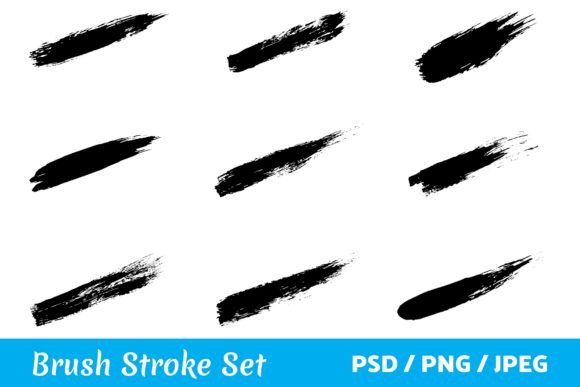
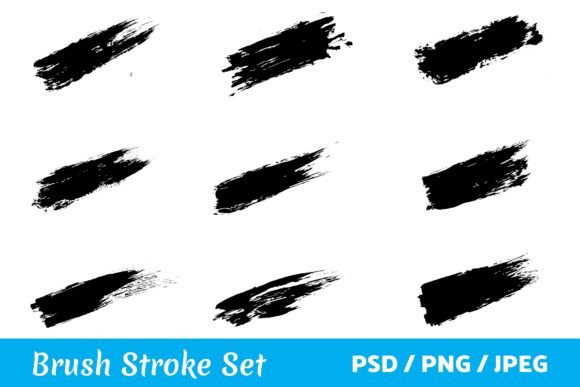
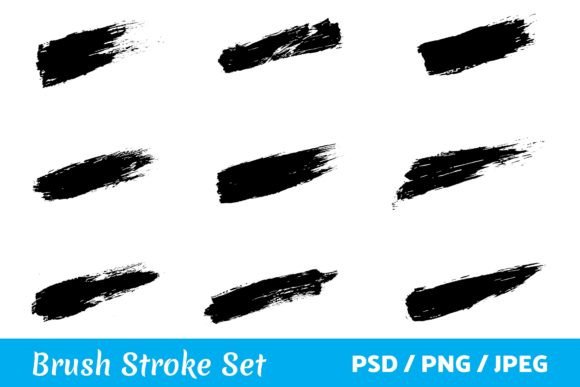
The Grunge Stroke Effect mimics the unpredictability of physical paint application. Unlike clean vector lines, these strokes carry imperfections—splatters, uneven edges, and varying opacity—that replicate human touch. This set is perfectly created for your creative projects because it bridges the gap between digital precision and analog warmth. Whether you are working on a high-end brand identity or a casual social media post, the ability to quickly apply authentic-looking brushwork saves hours of manual painting or complex layer masking.
Compatibility and File Formats: Ensuring Seamless Integration
One of the most critical aspects of any digital asset is its compatibility with your existing software ecosystem. This set of paintbrush strokes comes in different formats so you can use these paintbrush strokes anywhere you want. Specifically, the inclusion of PSD, JPEG, and PNG files ensures that the brushes are accessible regardless of your preferred design platform or technical skill level.
- PSD Files: For users working in Adobe Photoshop, the native PSD format allows for maximum flexibility. You can adjust blending modes, opacity, and color overlays non-destructively. This is ideal for professionals who require granular control over how the Grunge Stroke Effect interacts with underlying layers.
- PNG Files: These files come with transparent backgrounds, making them plug-and-play ready for almost any design software, including Canva, Illustrator, or Affinity Designer. They are perfect for quick compositions where you need to drag and drop elements without worrying about background removal.
- JPEG Files: While less flexible due to the lack of transparency, JPEGs are useful for web-based previews or when working in platforms that do not support alpha channels. They serve as reliable placeholders or final exports for specific print requirements where transparency is not needed.
By offering multiple formats, the creator of this Stroke Brush Set acknowledges that modern designers often switch between tools. You might start a logo concept in Illustrator, move to Photoshop for texturing, and finish in InDesign for layout. Having assets that travel smoothly across these boundaries prevents workflow bottlenecks.
Practical Applications Across Industries
The versatility of this brush set allows it to be applied in numerous contexts. Below are specific scenarios where integrating these strokes can elevate your output.
Branding and Identity Design
When creating a Logo or brand marks, a sterile look can sometimes feel cold or impersonal. Adding a subtle Grunge Stroke Effect can convey authenticity, ruggedness, or artisanal quality. For example, a coffee shop or a craft brewery might use these strokes to frame their logo, suggesting a handcrafted product. The key here is moderation; use the stroke as an accent rather than the primary focus to maintain legibility and professionalism.
Marketing and Social Media
In the realm of digital marketing, attention spans are short. A Social Media Banner or ad creative needs to stand out in a crowded feed. Using bold, textured strokes behind text can create contrast and draw the eye. You can use these brush strokes for your design to highlight key offers or call-to-action buttons. Because the files are available in PNG format, you can easily overlay them on photos or solid colors without extensive editing.
Print and Packaging
For physical products, texture translates to tactile appeal. On Packaging or a Book Cover, the visual suggestion of rough brushwork can imply premium quality or artistic merit. When preparing files for print, ensure you are using the high-resolution PSD or PNG versions to avoid pixelation. The organic nature of the Stroke Brush Set helps break up large blocks of color, adding visual interest to boxes, labels, and dust jackets.
Crafts and Personal Projects
Beyond commercial work, these assets are invaluable for Craft Projects and personal creations. If you are designing custom T-shirts or handmade Cards, the grunge aesthetic adds a unique, DIY feel that resonates with recipients. Hobbyists can use these strokes in digital scrapbooking or invitation design, allowing for creative expression without needing advanced illustration skills.
Workflow Strategies for Efficient Implementation
To get the most out of this Stroke Brush Set, consider adopting a structured approach to its usage. Randomly placing strokes can lead to a cluttered design. Instead, treat the Grunge Stroke Effect as a deliberate compositional element.
- Preparation: Before opening your design file, browse the included assets. Identify which strokes complement the mood of your project. Are you looking for aggressive, thick marks or subtle, wispy trails? Organizing your thoughts beforehand reduces decision fatigue during the design process.
- Layer Management: Always place brush strokes on separate layers. This practice allows you to experiment with blending modes such as Multiply, Overlay, or Screen. For a darker, integrated look, try Multiply; for a glowing effect, try Screen. This non-destructive method ensures you can tweak the intensity without redoing the work.
- Color Harmony: While the strokes may come in black or white, do not hesitate to recolor them. Use adjustment layers or hue/saturation tools to match the stroke color to your brand palette. A monochromatic scheme with a single accent color often works best with grunge textures, preventing the design from looking chaotic.
- Consistency: If you are using the Stroke Brush Set across multiple deliverables, such as a Website header and a matching Banner, maintain consistency in stroke style and scale. This creates a cohesive visual identity that reinforces brand recognition.
Quality Control and Long-Term Use
Integrating new assets into your library requires a commitment to quality control. Regularly review how the Grunge Stroke Effect appears in different contexts. Does it hold up at small sizes? Is it too dominant in minimalist layouts? By reflecting on these outcomes, you refine your intuition for when and how to use the Stroke Brush Set.
Furthermore, consider the long-term value of these files. Unlike trend-dependent graphics, textured brushes remain relevant because they address a fundamental design need: humanizing digital spaces. As you accumulate more projects, you will develop a personal library of modified strokes. Save your favorite configurations as templates or actions to speed up future workflows. This habit transforms a one-time purchase into a recurring productivity booster.
In conclusion, this set of paintbrush strokes is perfectly created for your creative projects because it offers flexibility, quality, and ease of use. Whether you are a seasoned designer optimizing a Logo or an entrepreneur crafting a Social Media Banner, the Stroke Brush Set provides the tools necessary to execute your vision efficiently. By understanding the formats, planning your integration, and maintaining consistency, you can leverage the Grunge Stroke Effect to produce compelling, professional-grade work across all your mediums.