Procreate 3D Glitter Gemstone Brush
Digital art has evolved rapidly, moving from flat illustrations to textured, dynamic compositions that catch the eye instantly. One of the most effective ways to add depth and luxury to your work is through the strategic use of sparkle and shine. The Procreate 3D Glitter Gemstone Brush offers a streamlined solution for artists who want to incorporate realistic, dazzling elements without spending hours manually painting each facet. This specialized tool is designed to bring immediate vibrancy to lettering, illustrations, and digital designs, making it an essential addition for creators looking to elevate their visual storytelling.
Understanding the Tool’s Purpose and Value
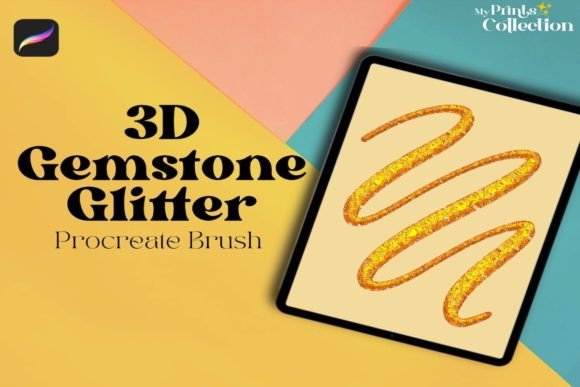
At its core, this brush is a digital asset created specifically for the Procreate ecosystem. Unlike standard round or square brushes that lay down uniform color, the Procreate 3D Glitter Gemstones Single Brush is engineered to simulate the complex light refraction of real gemstones. When you stroke across the canvas, it deposits shapes that mimic cut crystals, complete with highlights and shadows that suggest three-dimensionality.
The primary value lies in efficiency and realism. Manually drawing a glittering diamond or a scattered cluster of rhinestones requires advanced knowledge of light physics, perspective, and layering. For beginners, this can be daunting; for professionals working on tight deadlines, it can be time-consuming. This brush automates the intricate details, allowing you to focus on composition and color harmony rather than technical rendering. It bridges the gap between amateur sketches and polished, professional-grade artwork.
Ideal Applications for Creators and Businesses
The versatility of this tool extends far beyond simple decoration. Here are several practical contexts where the Procreate 3D Glitter Gemstone Brush shines:
- Digital Lettering and Calligraphy: Adding subtle sparkle to the terminals of letters or creating a jeweled effect on specific words can make quotes and logos pop. This is particularly useful for wedding invitations, greeting cards, and social media graphics.
- Fashion and Jewelry Design: Designers can quickly sketch concepts for accessories, visualizing how stones might look on a piece before committing to physical prototypes. It helps in presenting ideas to clients with a more finished look.
- Character Illustration: Enhance fantasy characters with magical armor, enchanted jewelry, or sparkling eyes. The 3D effect adds a layer of whimsy and power to character designs.
- Product Mockups: Small business owners selling physical goods like phone cases, notebooks, or apparel can use this brush to create attractive digital mockups that highlight glittery design elements.
Technical Requirements and Compatibility
Before purchasing, it is crucial to understand the technical environment required for this tool to function correctly. The Procreate 3D Glitter Gemstone Brush is exclusively compatible with the Procreate app on iPad. Specifically, you need Procreate App version 5 or higher. Older versions may not support the specific brush engine features used to create the 3D illusion.
It is important to note that this product is not compatible with Photoshop, Illustrator, or other desktop software. If you primarily work on a computer, this brush will not integrate into your workflow. Additionally, because this is a digital product, no physical item will be shipped to your address. Upon completing your purchase, you will receive a download link for a zip file sized at approximately 1 MB. This small file contains the .brushset file needed to install the tool directly into your Procreate library.
How to Get the Best Results
To maximize the potential of the Procreate 3D Glitter Gemstones Single Brush, consider these practical tips:
- Layer Management: Always use a new layer for your gemstones. This allows you to adjust opacity, blending modes, and position without affecting the underlying artwork. Try using "Add" or "Screen" blending modes to make the gems glow against darker backgrounds.
- Color Variation: While the brush creates shape and light, changing the color of the brush stroke can simulate different types of stones. Use cool blues for sapphires, warm reds for rubies, or soft pinks for rose quartz.
- Scale and Pressure: Experiment with the size slider and Apple Pencil pressure. Lighter touches can create distant, subtle sparkles, while heavier pressure produces bold, foreground gems. This variation adds depth to your composition.
- Watch the Tutorial: Most listings include a video demonstration. Watching this can reveal hidden features, such as how to rotate the stamp or adjust spacing, ensuring you get the exact look you desire.
Important Considerations Before Buying
While the Procreate 3D Glitter Gemstone Brush is a powerful tool, it is not a magic wand for poor composition. It works best when integrated thoughtfully into a well-planned piece. Overusing the effect can lead to visual clutter, so restraint is key. Aim for balance, using the gems to guide the viewer’s eye rather than overwhelming them.
Additionally, ensure your iPad screen is clean and calibrated for accurate color representation. Since the brush relies on light and shadow effects, viewing your art on a dim or color-distorted screen may mislead you about the final appearance. Finally, remember that this is a single brush file, not a massive pack. If you are looking for hundreds of varied textures, this focused tool offers quality over quantity, perfect for those who want one reliable, high-quality gemstone effect.
For educators and hobbyists, this brush serves as an excellent teaching aid for demonstrating light behavior in digital mediums. By observing how the pre-built facets react to color changes, students can learn fundamental principles of rendering without getting bogged down in complex manual techniques. Whether you are a freelancer polishing a client project or a casual user adding flair to a personal journal entry, this tool provides a quick, professional finish that enhances the overall appeal of your digital creations.